September 9, 2026
What's New: Checkout design improvements and more!
We’ve refreshed the Booqable checkout with a cleaner and more modern design to create a smoother booking experience for your customers when booking rentals from your website.
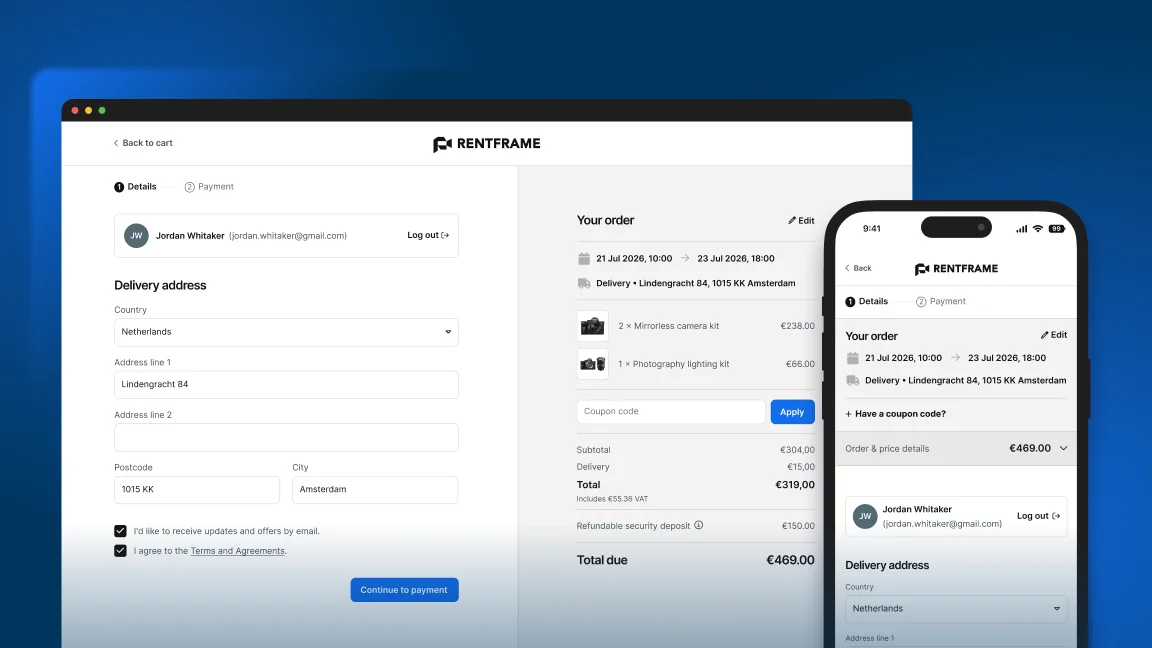
What has been improved in the checkout?
-
A clearer two-column layout: The checkout is now split into two sections, with the checkout form on the left and the order summary on the right. This gives the order summary more space to clearly display products, pricing, and other order details.
-
A cleaner top bar: Your store logo is now centered and the “Back to cart” button has moved to the left. This makes better use of the available space and creates a more balanced layout.
-
Mobile optimization: The new checkout is fully optimized for mobile, giving customers a seamless experience on any phone or device.
-
A more accessible coupon option: The coupon code button has been replaced with highlighted “Have a coupon code?” text, helping it blend more naturally into the order summary.
-
An easier-to-read order summary: Dividers have been added between sections, making the different parts of the order and price breakdown easier to scan.
-
A more visible login option: The account login button is now aligned with the customer information section, making it easier for returning customers to notice and log in during checkout.
Other fixes and improvements
Online store
- Customers could get a “cart expired” message at checkout after picking today as the start date when the day’s start time had already passed. The date picker now prevents choosing a start that has already expired so they are always choosing valid dates.
Invoices
- Fixed an issue where finalizing an invoice could be submitted twice, which left gaps in the invoice number sequence (missing invoice numbers). Invoice numbering now stays correct and invoices are only submitted once.
Billing
- When changing plans, the payment summary clearly separates the full plan price, any credit from the current plan, and the “Due Today” amount that will actually be charged now on for a clearer explanation.
Mobile
-
In cases where companies had more than 25 email templates, sending an invoice from the mobile app could result in a “Email template ‘invoice_notify’ not found” error. This has been resolved and invoices will send successfully no matter the number of email templates you have created.
-
Amount fields previously open with the wrong decimal which has now been updated. Before, you would see
€33.0which has now been updated to€33,00. -
We’ve added an empty message when no results appear on the dashboard.