Add rental bookings to your Shopify website
Turn your Shopify website into a rental storefront with real-time availability, online bookings, and inventory management powered by Booqable.

Turn your Shopify website into a rental storefront
Keep your existing Shopify website and add everything you need to accept rental bookings online. Customers can choose when they want to rent, check product availability, see rental prices, and complete their bookings.
Booqable provides the rental date picker, Add to cart elements with pricing and availability, shopping cart, and checkout. These work alongside your existing Shopify product pages, so you can keep your website’s design while adding rental booking functionality.
You manage rental products, inventory, pricing, and orders in Booqable. When customers make a booking, availability updates automatically on your Shopify website, helping you avoid double bookings.
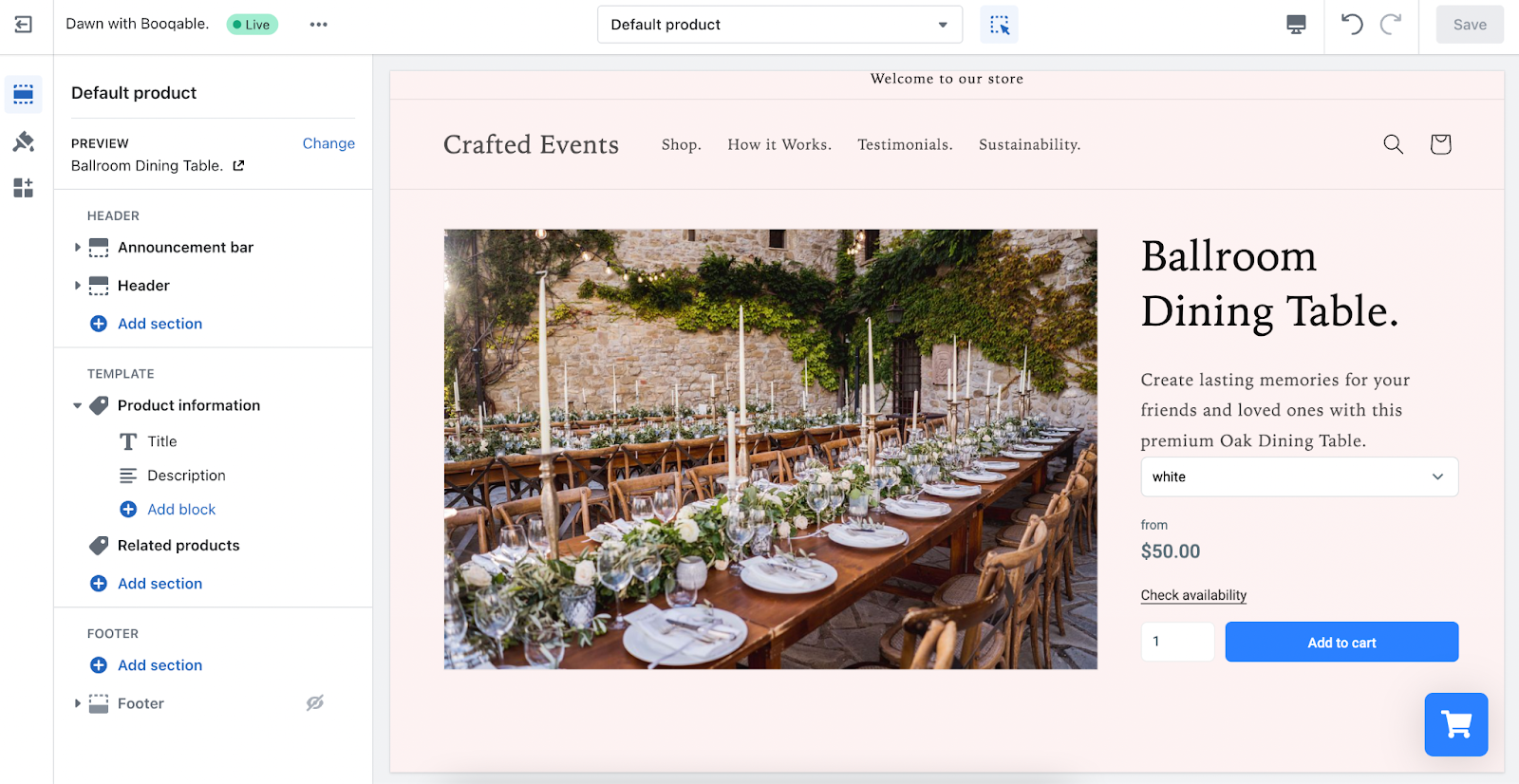
Example Shopify storefront with Booqable’s rental booking elements. View Shopify website examples
Why connect Shopify with Booqable?
Accept rental bookings
Let customers book rental products directly from your Shopify website. Add a date picker so customers can select their rental period, and replace Shopify’s standard purchase buttons with Booqable’s Add to cart elements.
Each element combines the product’s rental price, availability, quantity selection, and Add to cart button. Prices and availability are calculated based on the rental dates customers select.
Customers can add multiple products to their shopping cart and complete their reservation through Booqable’s checkout, where they can enter their details and make a payment.
Show real-time availability
Keep the availability on your Shopify website up to date automatically. Booqable tracks your rental inventory and existing bookings to determine which products are available for the dates customers select.
When new bookings are made or existing reservations change, the availability displayed on your Shopify website updates automatically. This helps prevent double bookings without manually adjusting inventory in Shopify.
Manage rentals in Booqable
Use Booqable to manage your rental products, bookings, inventory, pricing, and payments, while Shopify handles your website’s design and product pages.
Set up rental rates by the hour, day, or week, and create pricing rules for longer rental periods or specific dates. Booqable calculates the rental price based on the customer’s selected dates and displays it on your Shopify product pages.
When customers complete a booking, their order appears in Booqable. From there, you can review booking details, make changes, track inventory availability, and manage payments and security deposits.
How it works
Add rental booking functionality to your existing Shopify website in three steps.
01 — Configure your rental products
Create your rental products in Booqable and configure their inventory, availability, and pricing.
You’ll also need corresponding product listings in Shopify, where you can manage product names, images, descriptions, and page layouts.
02 — Add Booqable’s booking elements to Shopify
Connect Booqable to your Shopify website and add the following booking functionality:
- Rental date picker: Let customers choose their rental dates and times, so they can see prices and availability for their selected period.
- Add to cart elements: Replace Shopify’s standard purchase options with Booqable’s elements, combining rental prices, availability, quantity selection, and Add to cart buttons.
- Shopping cart: Let customers review their selected products, rental dates, quantities, and total price before checkout.
- Checkout: Connect your website to Booqable’s checkout, where customers can enter their details, confirm their reservation, and make a payment.
Booqable provides the code needed to add these elements to your Shopify website. Follow the installation guide to place them on your pages and hide Shopify’s standard purchase options for rental products.
03 — Accept and manage bookings
Customers select their rental dates, add products to their cart, and complete their booking through Booqable’s checkout.
Every booking appears automatically in Booqable, where you can manage orders, track inventory availability, and handle payments. Availability on your Shopify website updates as bookings are created or changed.
How Shopify and Booqable work together
| Topic | What to expect |
|---|---|
| Product information | Product listings, images, and descriptions are managed in Shopify. Corresponding rental products are also created in Booqable. |
| Rental pricing | Booqable calculates rental prices based on the selected rental dates and displays them through its Add to cart elements. |
| Availability | Booqable tracks rental inventory and bookings. Current availability is displayed automatically on your Shopify website. |
| Add to cart | Booqable’s Add to cart elements replace Shopify’s standard purchase options for rental products. |
| Shopping cart and checkout | Customers use Booqable’s shopping cart on your website and complete their bookings through Booqable’s checkout. |
| Order management | Rental orders, payments, and inventory are managed in Booqable, not Shopify. |
Pricing
Shopify and Booqable are separate services with their own subscription plans. You’ll need an active Shopify subscription and an eligible Booqable subscription to use the website integration.
Additional payment processing fees may apply depending on your payment provider.
Frequently asked questions
Explore more integrations

Squarespace
Display rental products and accept bookings on your Squarespace website.

Webflow
Integrate Booqable with Webflow to accept equipment rental bookings.

WooCommerce
Integrate Booqable with WooCommerce to accept online rental bookings.

WordPress
Connect your WordPress website to Booqable with the WordPress rental plugin.

Lovable
Integrate Booqable with Lovable and add online bookings to your website.
Try Booqable for free
Get full access for 14 days and see how easy managing rentals can be.
- Free 14-day trial
- No credit card required