Managing a rental business has many moving parts and pieces. Orders, inventory, customers, payments, and availability is always changing. Manually tracking every part is difficult, if not impossible, as your business grows.
This is where reporting becomes helpful. The right reporting will help you understand what is working, what needs attention, and what goals can be pursued.
Booqable reporting is built to give you that insight. Instead of sifting through spreadsheets, or trying to find a solution in your memory, you get a clear look at your business performance.
Here is a description of Booqable reports, and how rental businesses use them.
Understanding your best assets with the performance report
The report analyzes your inventory and tracks performance metrics over specific durations. The report explains product retention, duration, and downtime. Product analytics indicate which are overperforming and which are underperforming.
Additionally, a performance report will indicate both short and long term inventory goals.
Consider, for example, a camera rental. The performance report may illustrate a high demand for a specific lens. The demand could suggest frequent rentals, but what about retention? Lens rentals could taper off and lead to a low return on investment. In contrast, a more stock mid-range lens rental may sustain a high frequent return. Such analytics inform further investment decisions.
Fortunately, the report can convert to a CSV and Excel file format for easier team sharing and additional analysis.
Product performance data
For products, stock items, and consumables, you can see:
-
Date added
-
Quantity rented
-
Average rent duration
-
Charge duration
-
Average downtime
-
Downtime duration
-
Tags
This data shows how often your products are being rented and how long they stay in use versus sitting idle. It helps you understand which items are in high demand and which ones may not be contributing as much to your revenue.
There’s also a graph showing your best-performing products and when they perform best. This makes it easier to spot seasonal trends or peak demand periods.
You can filter this report by time period, tags, and product tracking type, whether bulk or trackable.
The ROI feature
Within the product performance report, you can also view ROI-related data:
-
Product purchase cost
-
Revenue
-
Profit
-
ROI
This gives you a clearer picture of how profitable each item is, not just how often it’s rented. You can compare the cost of purchasing an item against the revenue it generates over time, helping you make more informed buying decisions.
Analyzing customer value with the customer report
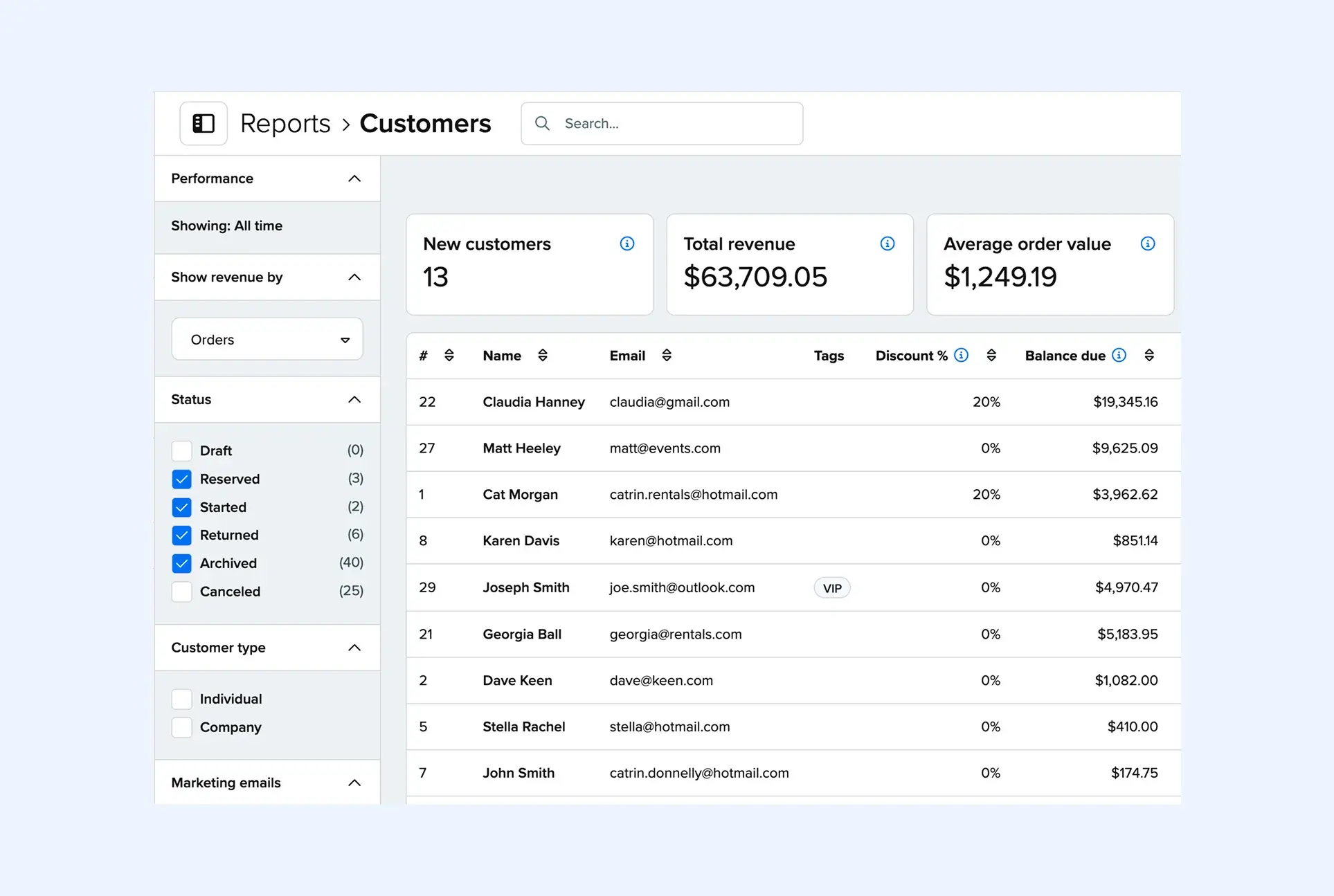
Customer insights report provides a breakdown of customer demographics and insights on their revenue contribution. It analyzes customer behavior and spending to see how they interact with your business. This will help you optimize your focus on high-value customer segments.
It assists you in making data-driven marketing decisions. It can help you customize promotions and outreach to select customer segments.
Suppose you operate a bike rental shop. This report could help you discover high-value frequent customers. You may identify customers who make weekend bookings tend to have high spend levels. This may motivate you to run specific email campaigns to promote weekend deals to your email subscribers.
You can export this report to CSV or Excel so you can work on the data outside of Booqable.
Customer metrics
You’ll see a list of customers along with:
-
Total revenue
-
Average order value
-
Total balance due
-
Discount percentage
-
Balance due
-
Orders
-
Revenue
This helps you understand which customers bring in the most revenue and how they typically book. You can identify repeat customers, track outstanding balances, and see how discounts are affecting your income.
You can filter this report by:
-
Time period
-
Tags
-
Order status
-
Customer type
-
Whether they are subscribed to marketing emails
Planning stock levels with the availability report
The availability report shows your product list and how much stock is available for a selected time period. It gives you a clear view of what’s available and what’s already booked, so you can plan ahead with confidence. This is especially helpful during busy periods when inventory is in high demand.
It also makes it easier to respond to customer inquiries quickly since you can check availability in real time.
For example, if you were running an inflatable rental business, you may check the availability report before a holiday weekend. You could quickly see which popular items are nearly fully booked and which still have stock, helping you focus your marketing on items that are still available.
Availability overview
You can filter by:
-
Time period
-
Product tag
And there’s a search bar to quickly find specific items.
This report helps you understand what is available at any given time so you can avoid overbooking and make better use of your inventory. It also supports better planning when demand is high.
Preparing daily work with the fulfillment report
The fulfillment report helps you prepare for upcoming orders by showing which products are needed within a specific time period, such as today. It gives your team a clear overview of what needs to be picked, packed, or delivered. This reduces confusion and helps ensure that everything is ready on time.
It’s especially useful for coordinating daily tasks and keeping your team aligned.
For example, if you were running a construction equipment rental business, you may use the fulfillment report each morning. By filtering for delivery orders, your team could see exactly what needs to be prepared and loaded onto trucks for the day, helping everything stay on track.
This report can be exported to a CSV or Excel file for easy sharing or planning.
Fulfillment planning
You can filter by fulfillment type, such as pickup or delivery
This report gives your team a clear list of what needs to be prepared for upcoming orders. It reduces confusion and helps ensure that nothing is missed when fulfilling rentals.
Turning data into better decisions
Reports aren’t just about numbers. They help you spot patterns, understand customer behavior, and make more informed choices about your inventory and pricing.
With Booqable’s reports, you can track performance across your entire business, from products to customers. And because everything is filterable and exportable, you can dig deeper when you need to.
Over time, these insights add up. You start to see what drives revenue, which products perform best, and where there’s room to improve. And that’s what helps rental businesses grow with confidence.