January 8, 2026
Product update: More flexible bundles on orders and other improvements
Bundles on orders are no longer fixed. You can now edit individual items inside a bundle, without breaking it apart.
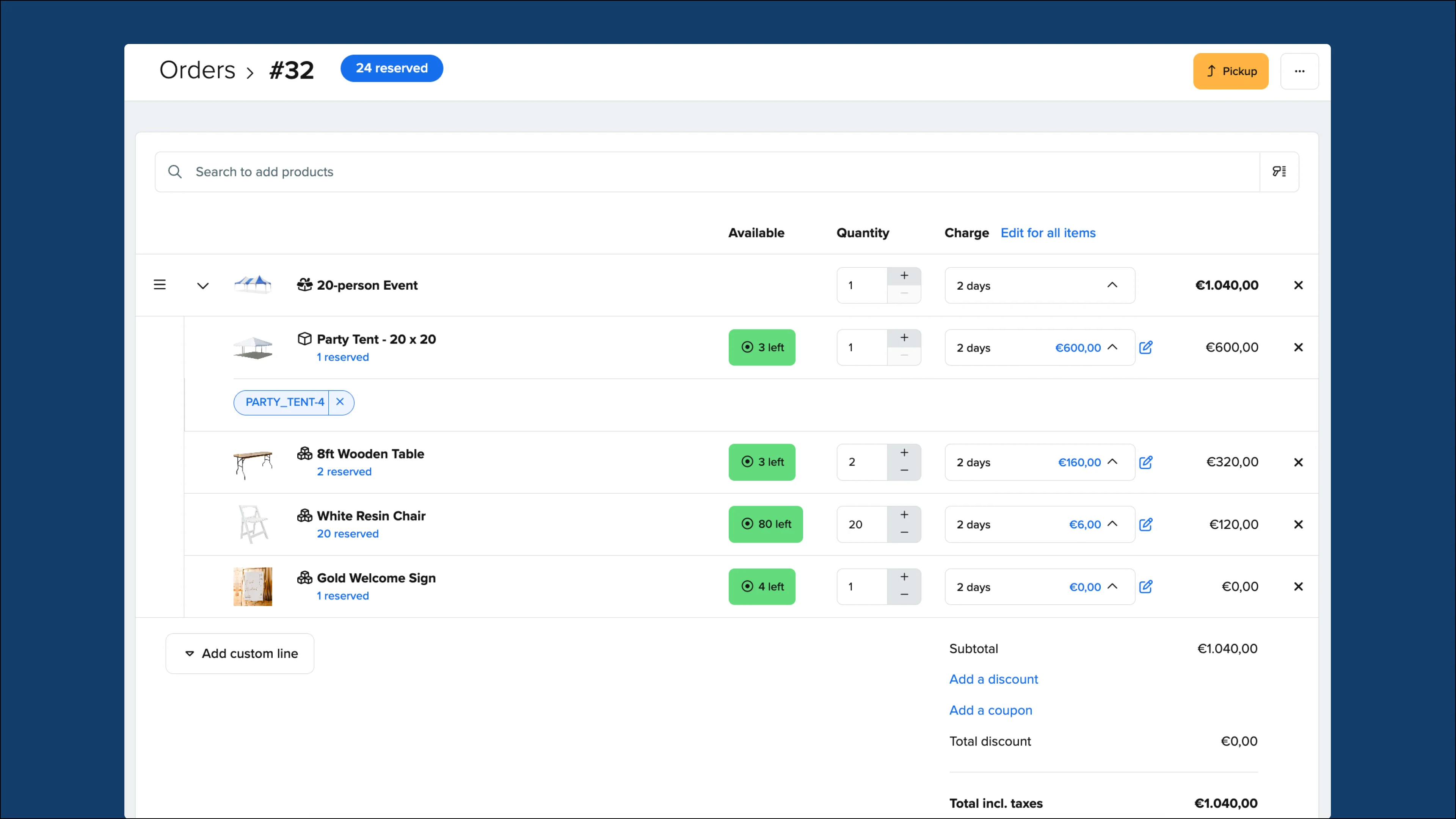
Increase quantities, adjust charges, or remove items while keeping the rest of the bundle intact. This lets you handle availability issues and customer changes without rebuilding the order.
For example, a customer might decide they no longer need chairs from a bundle, or increase quantities for items like cables or SD cards. You can make these changes directly inside the bundle, without breaking it apart or recreating the order.
Find out more about this update here: Edit the contents of bundles on orders
Fixes and improvements
-
The back-office calendar now shows more order details by default, including the order number, customer name, quantity, and full time range.
-
The Charge product setting in inventory is now a checkbox instead of a toggle, making it consistent with other inventory settings that are saved using the Save button.
-
Downtime scheduling is now smoother, with calendar popups consistently opening above date inputs to prevent the page from jumping.
-
Discount percentage validation has been fixed for customer imports. Imported discounts are now checked to ensure values are valid numbers between 0 and 100.