If you lend equipment to people, even occasionally, you need a way to track it. A sign-out sheet is one of the simplest and most effective tools for doing that. It tells you who has what, when they took it, and when they’re supposed to bring it back.
This article covers what a sign-out sheet actually is, why it’s worth using, which industries rely on them most, what to include in one, and how to put one together yourself.
What is an equipment sign-out sheet?
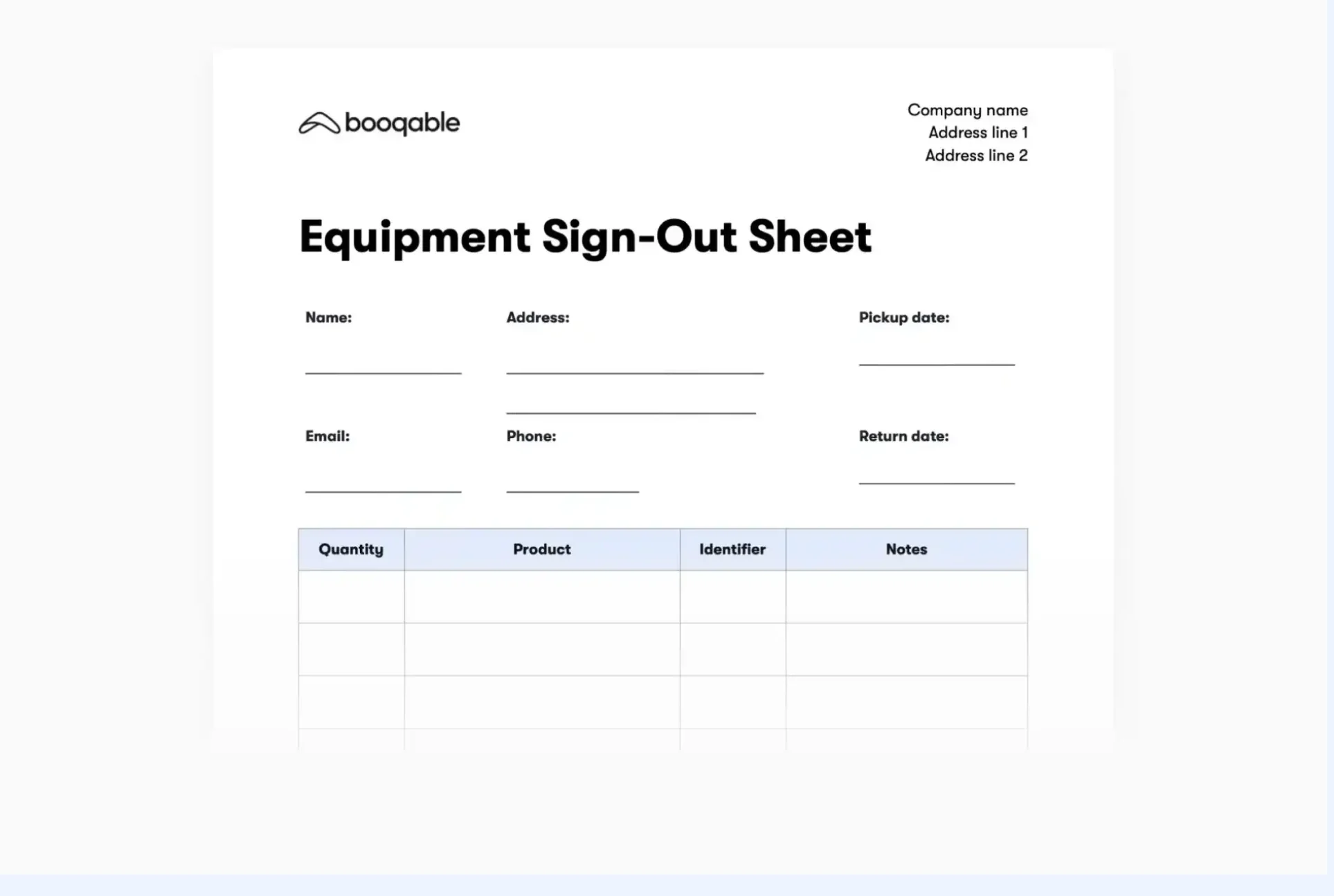
A sign-out sheet is a record that logs the borrowing and return of equipment. Every time someone takes a piece of gear, you or your team member can fill in their name, what they’re taking, when they’re taking it, and when it’s due back. When they return it, the condition gets noted and the record is closed out.
A checkout form works the same way, but is often used in more formal settings, like a school lab or a construction site, where there may be additional approval steps or liability considerations.
Together, sign-out sheets and checkout forms give you a clear picture of where your equipment is at any given time. Without them, things disappear. Not always because of theft, but because no one remembered who last had the camera, or which crew took the generator, or whether the projector ever came back from the off-site event.
Why use one?
The short answer: accountability.
When a team member signs out a piece of equipment, they’re acknowledging that a customer has received it. That one step changes how people treat the things they borrow. It also protects you if something goes missing or comes back damaged, because you have a record of exactly who had it and when.
Here’s what a checkout form helps you do in practice:
-
Track which items are out, who has them, and when they’re due back
-
Identify when equipment is frequently missing or always overdue
-
Document condition at sign-out and return, so damage disputes are easy to resolve
-
Spot patterns, like a particular piece of gear that keeps breaking, which might signal a maintenance issue
For a small business renting out camera equipment, this matters a lot. Say a client returns a lens and claims it was already scratched when they picked it up. If you recorded the condition at checkout with a sign-out sheet, you have something to refer to. If you didn’t, the dispute is much harder to resolve.
When to use a one
If you run a trailer hire business for example, you may have 15 trailers of different sizes, and on a busy weekend you might have 10 of them out at once. A sign-out sheet, whether on paper or digital, captures:
-
Which trailer left, and with which customer
-
The date and expected return time
-
The condition of the trailer when it went out (tyre pressure, lights working, any existing dents)
-
The customer’s contact details and signature
When the trailer comes back, you update the sheet with the return date and note any new damage. Over time, you build up a usage log that tells you which trailers are getting the most wear, which customers are consistently late, and when each trailer was last inspected.
The same logic applies to a camera rental business. A checkout form captures which body, lenses, and accessories left with which client. If a memory card goes missing or a lens hood comes back cracked, you know exactly when it happened and who was responsible.
For an event rental company hiring out tables, marquees, PA systems, or lighting rigs, a sign-out sheet tracks every item that leaves the warehouse and ties it back to a specific event and client.
Who uses equipment checkout forms?
Sign-out sheets and checkout forms are used across a wide range of industries. Here are the most common ones.
School checkout form
Schools and universities lend out a lot of equipment, laptops, cameras, projectors, microphones, tablets, and recording gear, and it moves between students, teachers, and departments constantly. A school checkout form tracks who borrowed what, assigns responsibility clearly, and creates a record that’s useful when something comes back broken or doesn’t come back at all. For media and film programs especially, where students check out expensive camera kits for shoots, having a formal sign-out process protects both the institution and the student.
Sports and ski equipment sign-out
Gyms, sports clubs, ski resorts, and recreational facilities loan out gear that sees heavy use and significant wear. A sign-out sheet helps staff track which skis, helmets, pads, or rackets are currently out, flag gear that’s overdue for inspection, and ensure customers have acknowledged the condition of the equipment before they take it. This is particularly relevant where safety is involved, because a sign-out sheet that records equipment condition creates a paper trail if an incident occurs.
Office equipment sign-out form
In offices where laptops, monitors, projectors, or AV equipment are shared between teams or taken off-site for client meetings, a checkout form keeps things from disappearing into someone’s home office indefinitely. It also helps IT departments manage their asset inventory without relying on people’s memories. When it’s time to upgrade or audit equipment, a sign-out sheet tells you exactly what you have and where it is.
Construction equipment checkout form
On a construction site, equipment is expensive, often rented from a supplier, and regularly moved between locations or crews. A checkout form tracks which tools and machinery left the yard, who signed them out, and when they’re expected back. It also supports accountability on sites where multiple contractors are working at once, since it’s clear who is responsible for each item. When equipment gets lost or damaged, the checkout form is the first place to look.
What to include in an equipment sign-out sheet
The exact fields you need will depend on your context, but here’s what most sign-out sheets and checkout forms include:
Equipment details The name of the item, model number, serial number if applicable, and any identifying features. The more specific, the better. “Canon EOS R5 body, serial no. 12345” is more useful than “camera.”
Borrower information Full name, contact number or email, and if relevant, employee ID, student number, or company name. You need to be able to reach this person if something goes wrong.
Sign-out date and time When exactly did the equipment leave? For time-sensitive rentals or shift-based workplaces, the time matters as much as the date.
Expected return date This sets a clear expectation for the borrower and gives you something to follow up on if the item isn’t back when it should be.
Condition at sign-out Note any existing wear, damage, or issues before the equipment leaves. This is the single most important field for avoiding disputes on return.
Signature The borrower’s signature confirms they’ve received the equipment, understood the terms, and accept responsibility for returning it in the same condition.
Return date and condition When the item comes back, record the actual return date and note the condition. If anything has changed, document it here.
Notes A free-text field for anything else worth capturing: accessories included, agreed exceptions, or special instructions.
How to create a sign-out sheet
You don’t need specialist software. Here are a few practical ways to put one together.
Google Docs or Microsoft Word Create a table with the fields listed above. Label each column clearly, print it out, and you’re done. This works well for lower-volume situations where you’re not tracking dozens of items a day. Google Docs has the added benefit of being shareable and editable from any device.
Google Sheets or Excel A spreadsheet is a step up from a printed form because you can filter, sort, and search your records. Each row is one sign-out event. You can add dropdown menus for equipment names to reduce typos, and use conditional formatting to highlight overdue items. For a trailer hire or event rental business handling dozens of transactions a week, a spreadsheet checkout form is a practical middle ground between paper and a full software system.
Using AI tools like Claude or ChatGPT If you want a customized sign-out sheet built quickly, you can describe your setup to an AI assistant and ask it to generate a template. For example: “I run a camera rental business and need a checkout form that captures the customer’s name, contact details, a list of items borrowed with serial numbers, sign-out and return dates, and a condition field.” You’ll get a working draft in seconds that you can refine and format as needed.
Extra tips
The form itself is only part of it. How you use it matters too.
Keep it consistent. If people skip the sign-out sheet when things are busy, the records become unreliable. Make it a firm part of the process, not an optional extra.
Store your records somewhere accessible. A printed sheet that lives in a binder on one person’s desk isn’t much use when that person is on holiday and equipment goes missing. Keep digital records where the right people can find them.
Do periodic checks. Cross-reference what your sign-out sheet says is out against what’s actually on the shelf. This turns up discrepancies early, before they become a bigger problem.
Train anyone who handles equipment. If your team doesn’t know how to fill in a checkout form correctly, or doesn’t understand why it matters, the system breaks down quickly. A five-minute explanation goes a long way.
A sign-out sheet doesn’t have to be complicated to do its job. The goal is a clear, consistent record of who has your equipment and when it’s coming back.
Whether you’re running a one-person camera hire operation or managing inventory across a construction company with multiple sites, a well-designed checkout form is one of the more straightforward things you can put in place to protect your assets and keep your operation running without unnecessary headaches.